What Actually Happens When You Type "What is Python?" Into ChatGPT

Software Engineer (SWE) specializing in Frontend development, proficient in JavaScript, React, Next.js, Angular, and a variety of frontend tools. Also skilled in MERN Stack. Committed to crafting clean, efficient code and driving innovation in every project. Passionate about collaborating with dynamic teams to create impactful solutions and continuously advance in the field of frontend development.
You type a question. A few seconds later, an answer streams back — fluent, confident, occasionally wrong. Most developers use this every single day without ever asking what's actually happening between the keystroke and the response. And honestly, you don't need to know. Until the day you do — the day your manager says "let's add an AI feature to the product" and suddenly you're the one who has to build it, not just use it.
That's the moment most engineers hit a wall. Using ChatGPT is trivial. Building on top of an LLM is a different beast entirely — you're suddenly dealing with API contracts, token limits, inconsistent outputs, five different providers with five different SDKs, and a model that occasionally decides your perfectly valid JSON request deserves a poem instead.
This article is the article I wish someone had handed me before I started. We're going to go top to bottom: what an LLM actually is, what happens behind the scenes when you ask one a question, why every provider's API feels like a slightly different flavor of the same headache, and how a framework called LangChain showed up to make that headache manageable. By the end, you'll understand not just the theory but the actual building blocks — models, prompts, prompt templates, and structured output — that you'll use to ship a real AI application.
No math. No model training. This is the practical, application-builder's view of generative AI — the view from where you, the engineer integrating these models into products, actually stand.
What We'll Cover
The Three Layers of the Generative AI World
What an LLM Actually Is
What Happens When You Type "What is Python?"
The Provider Problem — Why Every API Feels Different
Enter LangChain: What It Actually Solves
LangChain's Core Components
Prompts, Prompt Templates, and Structured Output
Common Pitfalls When You're Starting Out
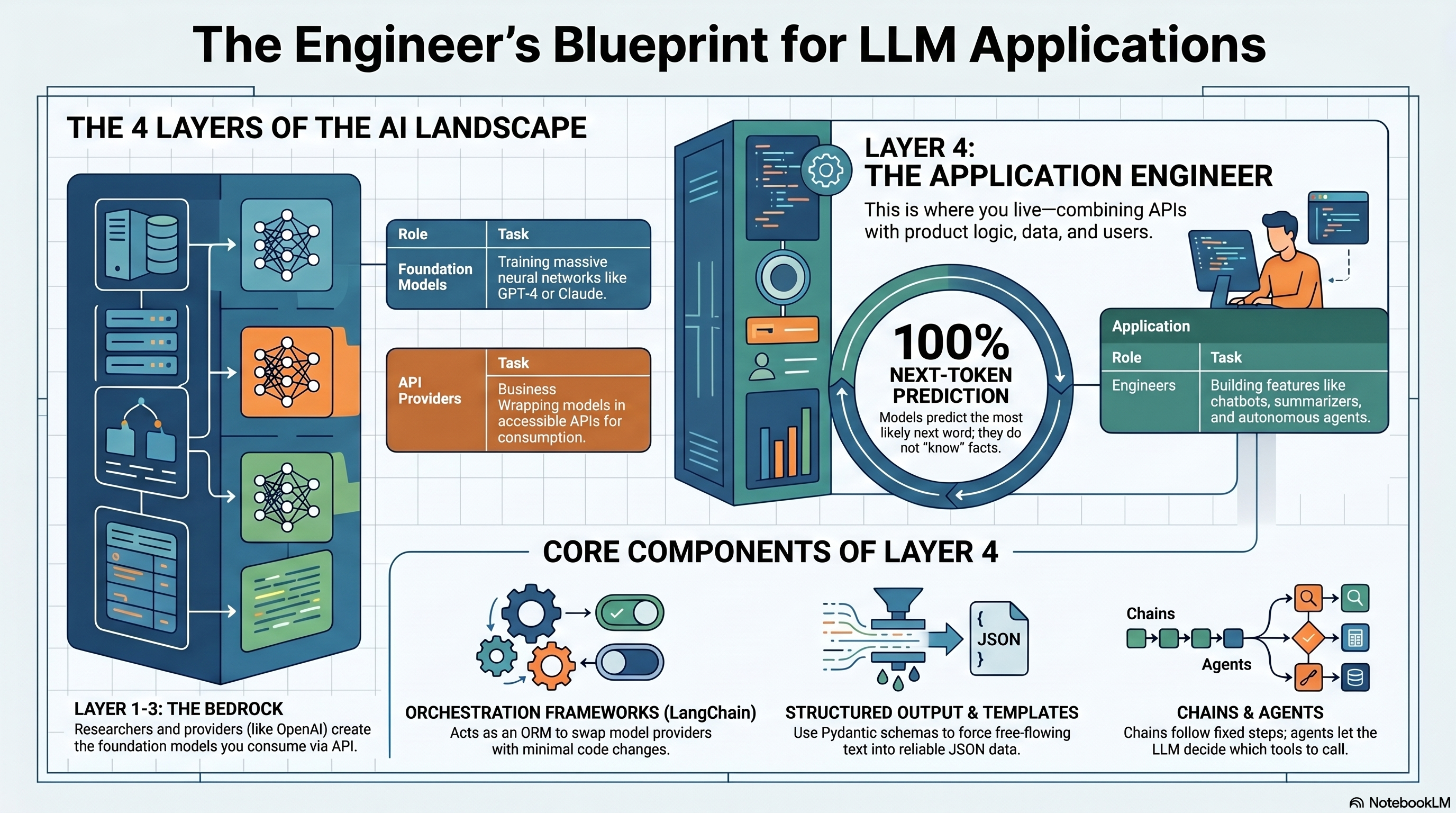
Chapter 1: The Three Layers of the Generative AI World
Before touching any code, it helps to mentally split the generative AI landscape into three layers. Almost every confusion beginners have comes from mixing these up.
Layer 1 — Research. This is where new model architectures get invented. Think of the teams that publish papers on attention mechanisms, new training techniques, or ways to make models reason better. This is heavy math, heavy compute, and frankly — most application developers will never touch this layer, and that's completely fine.
Layer 2 — Foundation Models (the "bedrock"). This is where research turns into actual trained models — GPT-4, Claude, Gemini, Llama, and so on. These are massive neural networks trained on enormous amounts of text, trained once (at huge cost), and then exposed to the world either as downloadable weights or, more commonly, as a hosted service. You don't train these. You consume them.
Layer 3 — Providers. This is the business layer — companies that take a foundation model and wrap it in an API you can actually call. OpenAI serves GPT models through their API. Anthropic serves Claude. Google serves Gemini. Same underlying idea — "send text in, get text out" — but every provider wraps it differently.
Layer 4 — You. This is where application engineers live. You don't do research. You don't train models. You take a provider's API, combine it with your product's logic, your data, your users' inputs, and you build something useful on top — a chatbot, a document summarizer, an autonomous agent, whatever your product needs.
💡 Pro tip: If you ever feel like you "need to learn machine learning" to build AI products, you usually don't. You need to learn Layer 4 well — APIs, prompting, orchestration, and your product domain. ML research skills matter for Layers 1 and 2, which is a completely different career path.
Here's the mental model as a quick diagram:
[ Research ]  →  [ Foundation Models ]  →  [ Providers ]  →  [ You: the App Builder ]
  (papers,         (GPT-4, Claude,           (OpenAI API,      (your product, your
   training         Gemini — trained          Anthropic API,    business logic, your
   techniques)       once, expensive)         Google API)       users)
Everything in this article lives at Layer 4. That's the layer where LangChain operates, and it's the layer where most AI Engineering jobs actually sit.
Chapter 2: What an LLM Actually Is
Strip away the hype and an LLM (Large Language Model) is, at its core, a very sophisticated next-word predictor. That's it. That's the whole trick.
Here's the analogy that actually makes this click: think about your phone's keyboard autocomplete. You type "I'm running" and it suggests "late." That's a tiny, dumb version of what an LLM does. Now imagine that same autocomplete, except instead of being trained on a few thousand text messages, it was trained on a meaningful chunk of the publicly available internet — books, code, articles, forums, documentation. And instead of predicting one word ahead with a simple lookup table, it predicts the next word (technically, the next token — a word piece) using a neural network with billions of parameters that has learned deep statistical patterns about how language, logic, and even code tend to flow.
That's it. An LLM doesn't "know" facts the way a database does. It doesn't "look things up." It generates the statistically most plausible continuation of the text you gave it, one token at a time, based on patterns absorbed during training.
This explains so much of LLM behavior that confuses beginners:
Why LLMs hallucinate: They're not retrieving facts, they're generating plausible text. If the plausible-sounding continuation happens to be false, the model has no internal alarm bell — it has no concept of "true" vs "false," only "likely" vs "unlikely" given its training.
Why phrasing your prompt differently changes the answer: You're changing the starting point of the prediction, which changes what's statistically "next."
Why longer context helps: More context = more signal for the model to condition its next-token predictions on.
⚠️ Heads up: Treating an LLM as a search engine or a database is the single most common beginner mistake. It's a text-completion engine with extraordinary pattern recognition — powerful, but fundamentally different from a system that retrieves ground-truth facts. This is exactly why techniques like RAG (Retrieval-Augmented Generation) exist — to bolt real, retrievable facts onto a model that otherwise just predicts plausible text.
Chapter 3: What Happens When You Type "What is Python?"
Let's make this concrete. You open ChatGPT, type "What is Python?", hit enter. Here's the actual pipeline, simplified but accurate:
Step 1 — Tokenization. Your text isn't fed to the model as English words. It's broken into tokens — sub-word chunks. "What is Python?" might become something like ["What", " is", " Python", "?"], each mapped to a numeric ID the model actually understands. Models don't read letters; they read numbers.
Step 2 — Embedding. Each token ID gets converted into a vector — a long list of numbers (think hundreds or thousands of dimensions) that represents that token's meaning in a mathematical space. Tokens with similar meanings end up with mathematically similar vectors. This is how the model captures meaning, not just spelling.
Step 3 — The Forward Pass (the actual "thinking"). These vectors flow through the model's neural network layers — for modern LLMs, this is a transformer architecture, which uses a mechanism called attention to weigh how much every word in your input should influence every other word. This is the expensive, GPU-hungry computation step.
Step 4 — Next-Token Prediction. The model outputs a probability distribution over its entire vocabulary — essentially "given everything so far, here's how likely each possible next token is." Maybe "Python" has a 40% chance of being followed by " is", a 25% chance of " was", and so on across thousands of candidate tokens.
Step 5 — Sampling. The system picks one token from that distribution (not always the single most likely one — there's controlled randomness, governed by a setting called temperature, which is why asking the same question twice can give slightly different answers).
Step 6 — Repeat. That chosen token gets appended to the input, and the entire process runs again to predict the next token. This repeats — token by token — until the model produces a stop signal or hits a length limit.
That's why responses stream in word by word — that's not a UI trick, that's literally how the generation works under the hood. Every word you see appear is a fresh pass through billions of parameters.
# A wildly simplified mental model of what's happening — NOT real model code,
# just illustrating the loop structure of autoregressive generation.

prompt_tokens = tokenize("What is Python?")  # Step 1: text -> tokens
generated = prompt_tokens

while not is_stop_token(generated[-1]) and len(generated) < max_length:
    vectors = embed(generated)                 # Step 2: tokens -> meaning vectors
    probabilities = model.forward(vectors)      # Steps 3-4: the transformer "thinks"
    next_token = sample(probabilities, temperature=0.7)  # Step 5: pick next token
    generated.append(next_token)                # Step 6: repeat with new context

response = detokenize(generated)
Every single API call you make to OpenAI, Anthropic, or Google is, underneath all the infrastructure, running this loop.
Chapter 4: The Provider Problem — Why Every API Feels Different
Once you decide to build something real, you quickly discover that "calling an LLM" isn't standardized. Here's what that looks like in practice:
OpenAI's chat completion format wraps messages in a messages array with role and content fields, and you call client.chat.completions.create(...). Anthropic's Claude API looks similar on the surface but has different parameter names, a different way of handling system prompts, and different response object structures. Google's Gemini API differs again — different SDK, different conventions for multi-turn conversation, different ways of handling function calling.
Now multiply that by the actual problems teams run into:
Switching cost. You build your app on OpenAI, then your company wants to evaluate Claude for better reasoning on a specific task, or Gemini for cost reasons. Now you're rewriting your integration layer from scratch.
Inconsistent output formats. Getting reliable structured JSON out of one provider doesn't mean the same prompting trick works on another. Each model has its own quirks.
No standard for memory. If you want a chatbot that remembers earlier turns in a conversation, you have to manually manage and re-send conversation history — and every provider expects that history shaped slightly differently.
No standard for tools/agents. Letting a model call external functions (e.g., "look up the weather," "query a database") is implemented differently across providers.
Chaining is manual. Real applications rarely call an LLM once. You might retrieve documents, feed them into a prompt, get a response, parse it, feed that into another prompt. Wiring this by hand, per provider, gets messy fast.
This is the exact pain point that gave rise to orchestration frameworks — and the most widely adopted one is LangChain.
Chapter 5: Enter LangChain — What It Actually Solves
LangChain is a framework that sits between you and the raw LLM provider APIs, giving you a consistent set of abstractions regardless of which model is powering things underneath. Think of it less like "a new way to talk to AI" and more like an ORM (like SQLAlchemy or Prisma) — except instead of abstracting away different SQL databases, it abstracts away different LLM providers.
The pitch is simple: write your application logic once, swap the underlying model with minimal code changes. Switch from GPT-4 to Claude to test which gives better results? In a well-structured LangChain app, that can be close to a one-line change, not a rewrite.
But LangChain solves more than just "different APIs." It gives you standardized, composable building blocks for the patterns that show up in every real LLM application: managing prompts as reusable templates, chaining multiple steps together, maintaining conversation memory, retrieving relevant data before generating a response, and letting models call external tools as agents.
⚠️ Heads up: LangChain is not magic and it's not the only way to build AI applications — you can absolutely call provider SDKs directly, and for simple use cases, that's sometimes the better call (less abstraction overhead, fewer dependencies). Treat LangChain as a productivity tool for composable, provider-agnostic applications, not a mandatory layer for every project.
Chapter 6: LangChain's Core Components
LangChain is organized around a handful of core building blocks. If you understand these six, you understand the framework's mental model.
Models — The interface to the actual LLM. LangChain splits this into a few types:
Chat/Language models — text in, text out (or more precisely, message-in, message-out for chat models). This is your GPT-4, Claude, Gemini connections.
Embedding models — instead of generating text, these convert text into those numeric vectors we discussed in Chapter 3, used for search and retrieval (this is the backbone of RAG systems).
Multimodal models — models that accept more than just text: images, audio, sometimes video, alongside text.
Prompts — The input you construct to send to the model. We'll go deep on this in the next chapter since it's where most of your day-to-day engineering time actually goes.
Chains — A sequence of calls linked together, where the output of one step becomes the input of the next. Classic example: take a user's question → retrieve relevant documents → stuff those documents into a prompt → send to the LLM → parse the response. That's a chain.
Memory — A mechanism for persisting conversation history across multiple turns, so your chatbot doesn't forget what the user said three messages ago. Without memory, every API call is stateless — the model has zero awareness of anything outside the current prompt.
Indexes — Structures (usually backed by vector databases) that let you store and efficiently search large amounts of external data — your documents, your knowledge base — so the model can retrieve relevant pieces instead of trying to "know" everything.
Agents — The most advanced building block. Instead of you hardcoding the sequence of steps, an agent uses the LLM itself to decide what action to take next — which tool to call, in what order — based on the user's request. This is how you get an AI that can "search the web, then do math, then write a summary" without you scripting that exact flow.
User question
     │
     ▼
[ Prompt Template ]  ← fills in variables (user input, retrieved context, etc.)
     │
     ▼
[ Chat Model ]  ← OpenAI, Claude, Gemini — swappable
     │
     ▼
[ Output Parser ]  ← turns raw text into structured data your app can use
     │
     ▼
Your application logic
That diagram is, roughly, 80% of real-world LangChain usage. The remaining 20% layers in memory, retrieval, and agentic decision-making on top.
Chapter 7: Prompts, Prompt Templates, and Structured Output
This is the part that actually consumes most of your engineering time once you start building, so let's slow down here.
Simple Prompts vs. System + User Prompts
The crudest way to prompt a model is a single block of text — you just write what you want and send it. That works for quick experiments but falls apart fast in production.
Modern chat models instead expect a structured message format, typically split into roles:
System prompt — instructions that set the model's behavior, persona, and constraints before the conversation starts. Think of it as the model's "job description." ("You are a customer support assistant for a SaaS billing platform. Only answer questions related to billing. Keep responses under 100 words.")
User prompt — the actual input from the end user. ("Why was I charged twice this month?")
Separating these matters enormously. Mixing instructions and user input into one giant blob makes the model more likely to follow user instructions that override your intended behavior (a real security concern — this is part of how prompt injection attacks work). Keeping them separate is both cleaner and safer.
# Simple prompt — works, but rigid and hard to reuse or secure
simple_prompt = "You are a billing assistant. Why was I charged twice?"

# System + User separation — the standard production pattern
messages = [
    {
        "role": "system",
        "content": "You are a customer support assistant for a SaaS billing platform. "
                    "Only answer questions related to billing. Keep responses concise."
    },
    {
        "role": "user",
        "content": "Why was I charged twice this month?"
    }
]
Prompt Templates
Here's a problem you'll hit on day one of building anything real: your system prompt is mostly static, but parts of it need to change based on context — the user's name, the retrieved documents, the current date, the product they're asking about. Hardcoding f-strings everywhere gets messy and error-prone fast, especially once you have dozens of prompts across your codebase.
Prompt templates solve this by treating prompts like reusable functions with parameters — define the structure once, fill in the variables at call time.
from langchain.prompts import ChatPromptTemplate

# Define the template ONCE, with placeholders for dynamic values
template = ChatPromptTemplate.from_messages([
    ("system", "You are a support assistant for {product_name}. "
               "Today's date is {current_date}. Be concise and friendly."),
    ("user", "{user_question}")
])

# Reuse it for every request — just swap in the variables
filled_prompt = template.format_messages(
    product_name="Acme Billing",
    current_date="2026-06-21",
    user_question="Why was I charged twice this month?"
)
This isn't just convenience. Templates make prompts testable (you can version them, diff them, A/B test wording changes), consistent (every call follows the same structure, reducing weird edge-case outputs), and maintainable (update the template in one place instead of hunting through scattered strings across your codebase).
💡 Pro tip: Treat your prompt templates the way you'd treat SQL queries or API contracts — version-controlled, reviewed in pull requests, and tested. A "small" wording tweak in a system prompt can meaningfully change model behavior in production.
Structured Output
Here's the next wall every builder hits: LLMs naturally produce free-flowing text, but your application needs data — a JSON object you can parse, validate, and plug into a database or UI. "Just ask the model to return JSON" sounds simple and, often, isn't — models sometimes wrap JSON in explanatory prose, use inconsistent field names, or produce almost-valid-but-broken JSON.
LangChain addresses this with structured output tooling — you define the shape of data you want (often using a schema, like a Pydantic model in Python), and LangChain handles instructing the model to conform to it and parsing/validating the result.
from pydantic import BaseModel, Field
from langchain.chat_models import init_chat_model

# Define the EXACT shape of data you want back — not free text
class SupportTicketSummary(BaseModel):
    issue_category: str = Field(description="One of: billing, technical, account, other")
    urgency: str = Field(description="One of: low, medium, high")
    summary: str = Field(description="One sentence summary of the user's issue")

model = init_chat_model("gpt-4", model_provider="openai")

# Bind the schema — the model's response will be coerced into this structure
structured_model = model.with_structured_output(SupportTicketSummary)

result = structured_model.invoke(
    "Why was I charged twice this month? This is really frustrating, "
    "I need this fixed before my card gets declined again."
)

# 'result' is now a validated SupportTicketSummary object, not raw text:
# SupportTicketSummary(
#     issue_category="billing",
#     urgency="high",
#     summary="User was double-charged and needs urgent resolution."
# )
This is the difference between "an AI feature that's a fun demo" and "an AI feature that reliably feeds your database without crashing on a malformed response." Structured output is, in practice, one of the highest-leverage things to get right early — almost every real AI feature eventually needs the model's output to plug into something downstream: a UI component, a database row, an API call to another system.
Chapter 8: Common Pitfalls When You're Starting Out
A few things that trip up almost everyone in their first few weeks of AI application development:
Treating the system prompt as a suggestion, not a contract. Vague system prompts ("be helpful") produce inconsistent behavior. Specific, constrained system prompts produce reliable behavior. Be explicit about scope, tone, format, and what the model should refuse to do.
Skipping output validation. Even with structured output tooling, always validate what comes back before trusting it downstream — models can still fail to conform perfectly, especially with complex nested schemas.
Forgetting that "memory" isn't automatic. Without explicit memory handling, every API call is a blank slate. If your chatbot seems to have amnesia, it's because you're not re-sending prior conversation turns.
Over-engineering with agents too early. Agents are powerful but unpredictable and harder to debug than a fixed chain. Start with a simple, deterministic chain. Reach for agents only when the task genuinely requires dynamic decision-making.
Ignoring token costs and limits. Every provider charges per token and enforces context length limits. Long conversation histories, large retrieved documents, and verbose system prompts all add up fast — both in cost and in risk of hitting context limits.
Wrapping Up
If there's one mental model to walk away with, it's this: an LLM is a next-token predictor wrapped behind a provider's API, and everything you build sits on top of that simple loop. The real engineering work — the part that actually makes a product good — isn't in the model itself. It's in how well you structure your prompts, how reliably you turn model output into usable data, and how thoughtfully you chain steps together to solve an actual user problem.
LangChain doesn't replace that thinking — it gives you a consistent vocabulary and toolkit to express it, regardless of which provider's model happens to sit underneath. Learn the six building blocks — models, prompts, chains, memory, indexes, agents — and you'll find that almost every AI application you encounter, no matter how complex it looks from the outside, is built from some combination of these same simple pieces.
The next step from here is hands-on: pick a tiny project — a document Q&A bot, a structured data extractor from messy text, anything real — and build it with a prompt template and structured output from the start. That's where this stuff actually clicks.
Follow me on : Github Linkedin Threads Youtube Channel


